✅ What We Like
- Effortless plug and play setup with immediate recognition across popular broadcasting tools.
- Flexible mounting options, including standard tripod threads and monitor mounts.
- Automatic portrait and landscape orientation switching when rotated on the mount.
- Built in stereo microphone for quick voice capture without extra gear.
❎ Needs Improvement
- Short attached USB C cable creates real routing headaches around larger sim rigs.
- Native image adjustment options feel quite restricted without using OBS filters.
- Bloated proprietary software suite that offers poor lighting correction in dark room environments.
- Price tag feels steep for what is ultimately entry level video output.
Introduction: Framing Your Driver Cam
When you build a dedicated sim racing setup, adding a face camera or pedal camera is usually the next step once your driving hardware is sorted. Whether you want to stream your iRacing official sessions on Twitch, record telemetry overlays for YouTube, or just show your friends your footwork on a heavy load cell brake pedal, a reliable camera is essential.
At roughly £139, the Logitech StreamCam sits in a somewhat confusing position in the market. On paper, it promises full HD 1080p resolution at 60 frames per second alongside smart auto focus features. However, after integrating it into a full sim rig environment, it quickly becomes clear that this device occupies a tricky middle ground. It falls short of high end streaming quality, yet carries a price tag far higher than basic entry level webcams.
Check out current pricing and availability here: Logitech StreamCam on Amazon.
Build Quality & Hardware Features
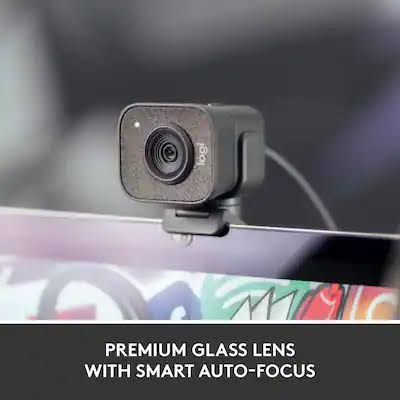
Out of the box, the StreamCam has a modern, blocky aesthetic with a textured fabric fascia surrounding the glass lens. The camera body feels sturdy enough, and the included mount clips securely onto most thin monitor bezels or mounts directly onto a standard quarter inch tripod thread. A neat hardware feature is its auto orientation sensing; flipping the camera 90 degrees on its mount automatically shifts the video feed into vertical mode for mobile streaming.
However, the hardware choices present immediate frustrations for sim racers routing cables around extruded aluminium frames or triple monitor arms.

Cable Routing & Connectivity Challenges
- Fixed USB C Cable: The camera uses a hardwired 1.5 metre USB C cable. Because it is permanently attached to the housing, you cannot simply plug in a longer custom cable.
- Short Reach: For a typical sim cockpit where your PC tower might sit on the floor or behind a large monitor stand, 1.5 metres is uncomfortably short.
- Lack of Adaptors: Logitech does not include a USB C to USB A adaptor in the box. If your motherboard lacks a spare rear USB C port, you are forced to buy an external extension cable or adaptor kit just to get it connected.
For mounting clamps and rig extension hardware, you can browse options here: USB C extension cable & USB C to USB 3.0 adaptor
On Track Performance & Driving Feel
When tested as a live driver camera during night stints or in dim cockpit environments, the StreamCam yields mixed results. Sim racing setups are notoriously tough on camera sensors because drivers often play in dark rooms lit only by the glare of dynamic monitors.
Under bright studio lighting, the 1080p 60fps feed is smooth and sharp enough. However, as soon as ambient light drops, the built in exposure and automatic lighting adjustments struggle significantly. The image becomes grainy, and the proprietary Logitech Capture software tends to overcompensate by introducing digital noise or washing out natural skin tones.
SIM RIG CAMERA TUNING TIP
Skip the official Logitech software suite entirely. To get a clean image in low light rig conditions, bypass auto exposure and manually adjust colour balance, gain, and custom filters directly inside OBS Studio or Streamlabs.
While the built in stereo microphones do a decent job for casual voice chats, any serious broadcaster will still want a dedicated boom microphone to avoid picking up the loud clatter of paddle shifters and direct drive wheel feedback. The StreamCam gets the job done for basic video capture, but fine tuning the image to look presentable takes more manual tweaking in Open Broadcaster Software (OBS) than it should at this price point.
Browse lighting kits and streaming accessories here: Streamer Lighting Kits on Amazon.
Final Verdict & Recommendation
The Logitech StreamCam is a functional piece of hardware that delivers decent 60fps video, but its price tag puts it in an awkward spot. It is too expensive to serve as a cheap budget impulse buy for beginners, yet its low light performance and fixed short cable prevent it from satisfying content creators seeking true high end quality.
If you stumble across it on a heavy discount and have a spare USB C port right next to your wheel stand, it offers straightforward plug and play utility. Otherwise, most sim racers will be better served saving up for a dedicated camera setup or opting for a more affordable entry level alternative.
P1R Verdict Card
The Bottom Line:
A middle of the road webcam caught between entry level quality and mid range pricing, best reserved for casual creators who can catch it on a steep discount.
P1R Rating: 3 / 5
Looking to improve your lap times?
Get the AB Racing Line Engineer to find out where you’re losing time and get faster now.