Build Your Own Stream & Gaming Button Box (The Easy & Affordable Way!)
Tired of fumbling with keyboard shortcuts mid-stream or needing more inputs for your favourite sim game? I was too! That’s why I decided to build my own custom button box. It’s surprisingly simple, budget-friendly, and you can tailor it perfectly to your needs. Let’s dive in! 🚀
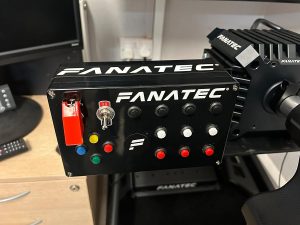
The Parts List 🛠️
The heart of this project is its simplicity. I opted for readily available and robust components. Because I bought multi-packs, I even have enough left over to build a second one!
- Enclosure: A waterproof IP65 electronic junction box. These are tough, easy to work with, and look very clean.
- Buttons: A 24-pack of 12mm momentary push buttons. I only used 14 for my layout.
- Switches: A 4-pack of universal rocker toggle switches. I used 2 of these for on/off functions.
- The Brains: A Zero Delay Arcade USB Encoder. This is the magic part that makes it all plug-and-play.
- Tools: A drill and a 4-22mm step drill bit. A step drill bit is perfect for creating clean, perfectly sized holes in plastic.
The Build Process
This whole project can easily be done in an afternoon. Here’s how I did it.
Step 1: Plan Your Layout
Before drilling, I laid out my buttons and switches on top of the box lid to find a configuration that felt intuitive and comfortable for me. Think about what you’ll use it for. Group related functions together!
Step 2: Drill the Holes
With my layout finalised, I used the step drill bit to make the holes. The great thing about this tool is you can slowly enlarge the hole until the button fits perfectly snug. Since my buttons were 12mm, this was a breeze.
Step 3: Install & Wire Everything
Next, I mounted the 14 push buttons and 2 toggle switches into the holes I’d drilled. Wiring couldn’t be easier with the Zero Delay USB Encoder. Each button has two wires going to a single terminal; just plug into the button and to the encoder board. The encoder kit comes with all the necessary pre-crimped wires, so there’s no soldering required!
Step 4: Software Setup
Once everything was connected, I plugged the encoder’s USB cable into my PC. Windows immediately recognised it as a generic game controller. To make it truly powerful, I use a fantastic free program called JoyToKey. Just head over to the site and download the latest version for free. This application lets you map each button press on your box to any keyboard key, macro, or mouse click. A quick setup and I was ready to control my stream and games with a single press.
Optional Mounting
While you can just leave the box on your desk, I wanted a more permanent solution. I mounted mine to my desk rig using two small shelf brackets, a couple of roll-in M8 spring T-nuts and T-slot bolts. It’s now rock-solid and exactly where I need it.
Get Building! ✨
And that’s it! A custom, functional, and inexpensive button box that can seriously upgrade your gaming or streaming setup. It’s a fun project that gives you a truly useful piece of kit at the end.
Interested in building your own? You can find all the components I used on my Amazon Storefront!
Looking to improve your lap times?
Get the AB Racing Line Engineer to find out where you’re losing time and get faster now.